Better After
(a work in progress)
Rethinking how we log movement when time and distance aren’t the point
Better After started with a simple question I couldn’t shake:
What if time and distance didn’t matter to someone? What would they actually want to track? What if we logged runs and workouts differently?
As a coach and a runner, I knew the default answers by heart: distance, time, pace, maybe heart rate if someone was particularly diligent.
But when I talked to athletes, especially people coming back from injury, managing stress, or trying to build a consistent habit, that’s not how they defined a “good” day. They talked about anxiety dropping, feeling like themselves again, or being proud they showed up at all.
Our tools were built for splits and PRs. Their actual experience was about something else entirely. Better After is my attempt to design for that version of success, and it’s very much a work in progress.
Snapshot
Moments over metrics:
Focus on how movement felt, not how fast or how far.
Experience-first logging:
Capture mood, reflection, context and one photo in a few seconds.
In-progress MVP:
Live, actively evolving prototype with early beta testers and ongoing iteration.
AI-assisted build:
Used AI for product exploration, prompts, and accelerating the MVP code.
Project summary
Problem:
Most training tools are optimized for performance tracking, not experience tracking.
Athletes who aren’t chasing PRs still feel pressure to measure success in numbers. People coming back from injury, burnout, or long breaks care more about:
Did I show up?
Did this help me feel better?
Do I want more days like this?
Those answers usually live in DMs and mid-run conversations, not in their logs. The moment I asked, “What if time and distance didn’t matter?”, the gap became obvious.
Approach:
I reframed the job:
Help people notice and remember how movement changes their day, not just their fitness.
From there, I designed a lightweight, experience-first tool with one core job: capture “moments after movement.”
Treat moments, not workouts, as the primary object.
Make metrics optional so the app still works if you never enter time or distance.
Keep friction extremely low with a single “Log a moment” flow and minimal required input.
Build it as a PWA so it can live on the home screen, feel app-like, and stay easy to update.
Use AI as a thinking partner: exploring edge cases, iterating prompts, and accelerating backend and app scaffolding.
Outcome:
Better After is in active development, running as a live MVP with early beta testers. So far it has:
Shifted success from “perfect data” to “honest check-ins after movement.”
Enabled athletes to capture small wins like “anxiety dropped” or “proud I showed up” alongside traditional metrics.
Created a more welcoming space for returners, injured athletes, and non-PR-focused movers.
Given me a concrete case study in going from in-the-wild observation to a shipped, AI-assisted product experiment.
The outcomes will continue to evolve as I learn from real usage and refine the app.
UX highlights
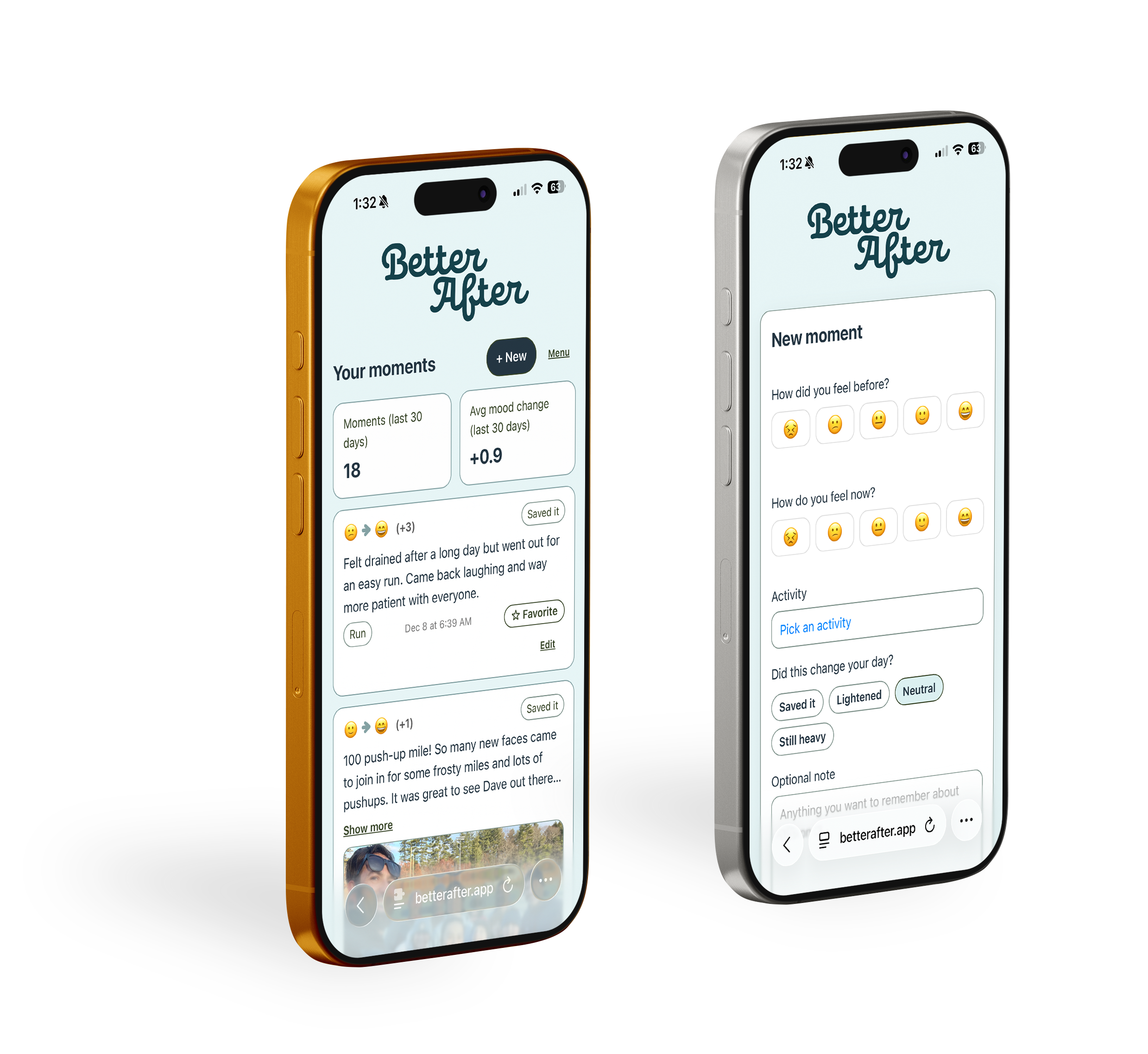
Moments as the core object
Designed the data model and UI around short “moments” instead of workouts. Each moment captures mood before/after, a reflection, optional activity context, tags, and one photo.
Single primary flow: “Log a moment”
The experience orbits one path: open Better After, tap “Log a moment,” check in, save, and return. No maze of features, no decisions about where to start.
Minimum required effort, optional depth
Mood-before and mood-after sliders are always present; everything else (activity type, “Did this change your day?”, notes, photo, favorites) is optional and progressively revealed. Users can be done in seconds or go deeper when they have more to say.
Metrics as context, not judgment
The interface is deliberately designed so time and distance are never required. Metrics can support the story of progress and consistency, but they’re not the judge of your efforts.
PWA for “always-with-you” logging
Built as an installable PWA with a configured manifest and service worker, so the app feels close at hand, loads fast, and can be updated frequently during this experimental phase.
AI integrated into the design and dev workflow
Used AI to explore user types and edge cases, generate and refine prompt language, plan phased delivery, and fill in backend and boilerplate gaps so I could get to a working MVP faster.
System thinking, even for an MVP
Applied lightweight design system thinking: type scale, color tokens for emotional states, spacing rules, and reusable patterns for cards, buttons, inputs, and sliders so the app can grow without losing clarity.